If you've deployed a Django app to production, there's a good chance NGINX was sitting in front of it — maybe copied from a tutorial, maybe inherited from a teammate, and rarely questioned until something broke.
This post fixes that. We'll cover what NGINX is, why it was created, and what each of its jobs actually means, and then wire it up in front of Django + Gunicorn with configs you can run.
1. Where NGINX comes from
In the early web, the model was simple: a browser asked one server for a page, and web server software on that machine built the response and sent it back.
That worked until traffic exploded. In the early 2000s, engineers started talking about the C10K problem — how to handle ten thousand concurrent connections on a single machine. Traditional servers like Apache (in its classic configuration) dedicated a process or thread per connection, which gets expensive fast.
Igor Sysoev built NGINX (released in 2004) around a different idea: an event-driven, asynchronous architecture where a small number of worker processes juggle thousands of connections each. The result was a server that's fast, light on memory, and especially good at serving static files.
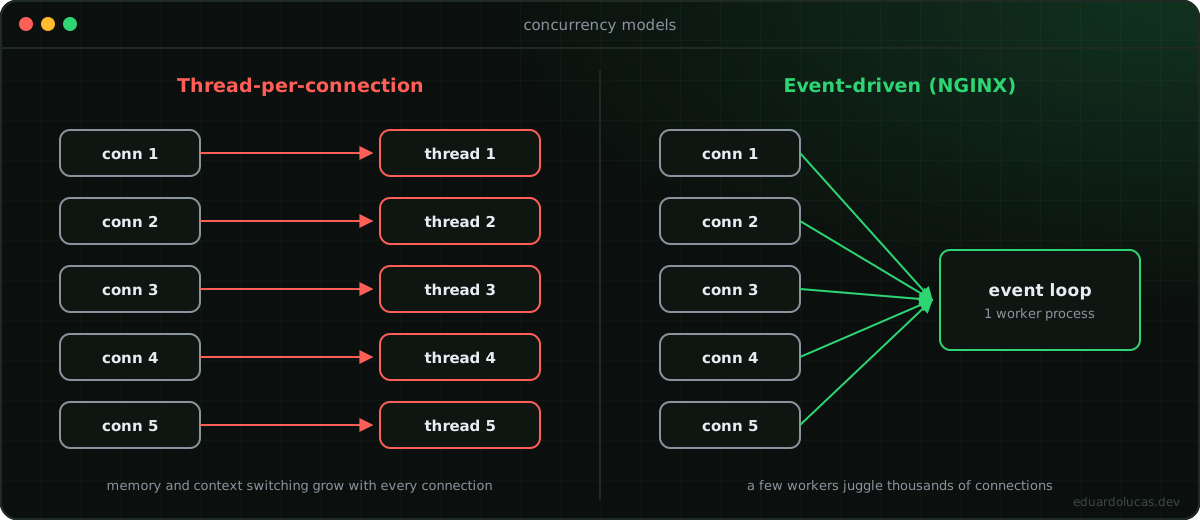 One thread per connection vs. a single event loop handling many connections.
That design is why NGINX ended up doing far more than "serving web pages."
2. From one server to many: NGINX as a reverse proxy
One server can only take so much. When traffic grows, you add more application servers — say, several Gunicorn instances running your Django app.
Now you have a new problem: who decides which server handles each request?
That's the job of a reverse proxy. "Proxy" means acting on someone else's behalf: NGINX accepts requests on behalf of your app servers and forwards them. Think of it as the concierge at the building entrance — visitors talk to the concierge, never wander the halls looking for the right office.
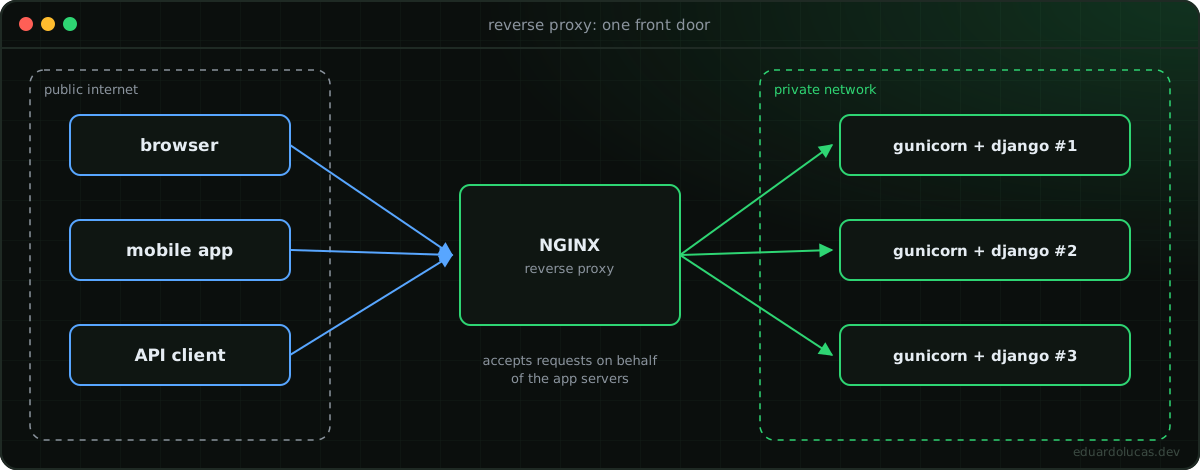 Clients only ever talk to NGINX; the app servers stay on a private network.
Once NGINX is in that position, it can do a lot of useful work. Let's go through the main jobs.
Job 1 — Load balancing
NGINX distributes incoming requests across a pool of backends (an upstream block). The most common strategies:
| Strategy | Directive | How it picks a server |
|---|---|---|
| Round robin | (default) | Rotates through servers in order |
| Least connections | least_conn; |
Server with the fewest active connections |
| IP hash | ip_hash; |
Same client IP always goes to the same server (sticky sessions) |
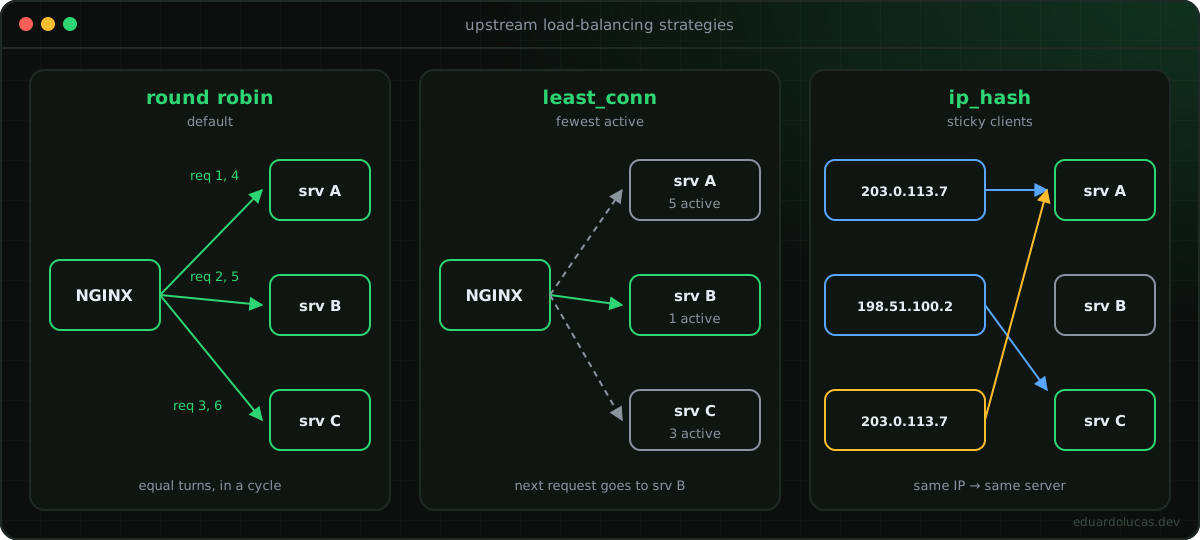 The three most common
upstream strategies side by side.
upstream django_app {
    least_conn;
    server web1:8000;
    server web2:8000;
    server web3:8000;
}
Job 2 — Caching
Picture a news article that a million people open in the same hour. If every request hits Django, queries the database, and renders the template from scratch, you're doing the exact same work a million times.
Instead, NGINX can cache the response once and serve the stored copy to everyone else until it expires. Your app servers and database never see most of that traffic.
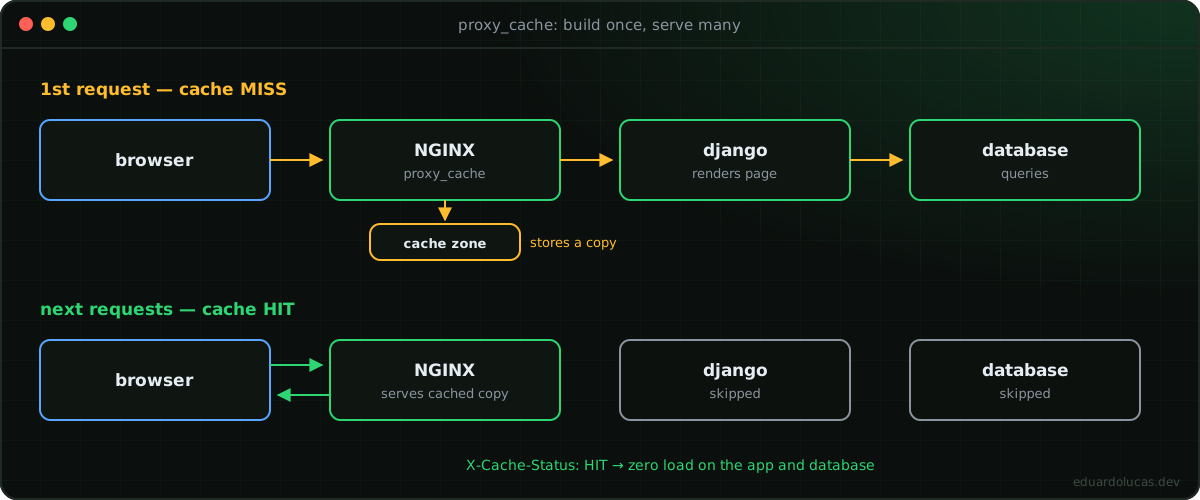 The first request builds the page; every request after that is served straight from NGINX's cache.
# In the http {} context
proxy_cache_path /var/cache/nginx levels=1:2 keys_zone=app_cache:10m
                 max_size=1g inactive=60m use_temp_path=off;

# In a location block
location /blog/ {
    proxy_cache app_cache;
    proxy_cache_valid 200 10m;   # cache successful responses for 10 minutes
    add_header X-Cache-Status $upstream_cache_status;
    proxy_pass http://django_app;
}
That X-Cache-Status header (HIT, MISS, EXPIRED…) is the easiest way to confirm the cache is actually working.
Job 3 — Security: shrinking the attack surface
Imagine 100 app servers, all directly reachable from the internet. An attacker only needs to find one unpatched library on one of them. You'd have to secure all 100 perfectly.
Put a reverse proxy in front and only one entry point is public. The app servers live on a private network. You concentrate hardening, rate limiting, request size limits, and monitoring in one place.
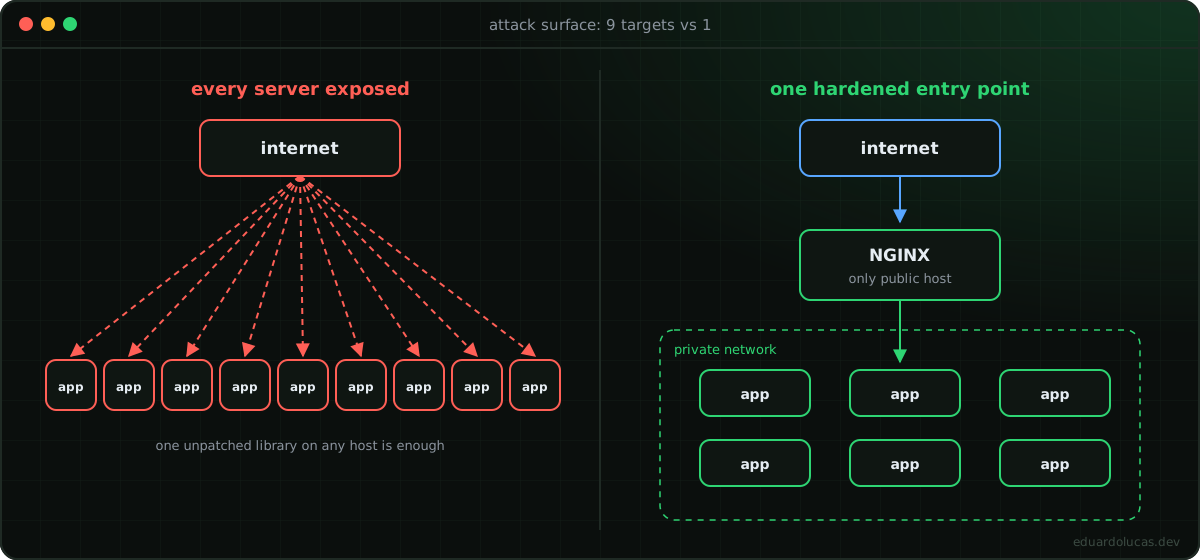 Nine public targets vs. one hardened front door.
limit_req_zone $binary_remote_addr zone=login_limit:10m rate=5r/m;

location /accounts/login/ {
    limit_req zone=login_limit burst=3 nodelay;
    proxy_pass http://django_app;
}
Job 4 — HTTPS / TLS
Since the proxy is the front door, it's the natural place to handle encryption. There are two common patterns:
- TLS termination — NGINX decrypts HTTPS and talks to the backends over the private network. Simplest and by far the most common setup.
- TLS passthrough / re-encryption — traffic stays encrypted all the way to the backend (either NGINX forwards it untouched, or re-encrypts it). Used when compliance or zero-trust requirements say internal traffic must be encrypted too.
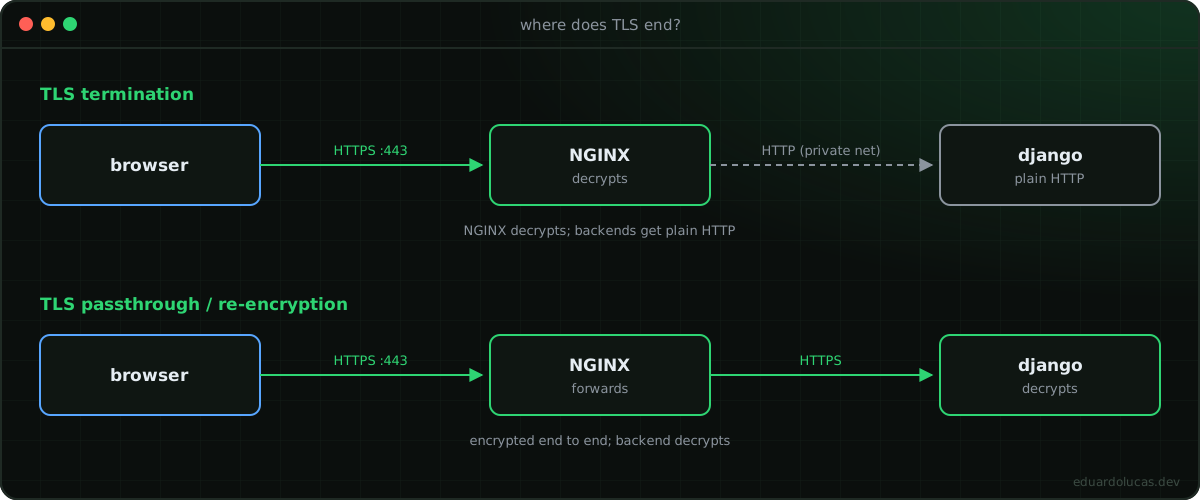 Where the encrypted connection ends changes who holds the certificates and who does the decryption.
Either way, you'll want to force HTTPS by redirecting everything on port 80:
server {
    listen 80;
    server_name example.com;
    return 301 https://$host$request_uri;
}
Job 5 — Compression and efficient delivery
Large responses cost bandwidth on both ends. NGINX can gzip text-based responses (HTML, CSS, JS, JSON) on the fly, often shrinking them by 70% or more:
gzip on;
gzip_types text/css application/javascript application/json image/svg+xml;
gzip_min_length 1024;
One correction to a common misconception: compression doesn't help much with video or JPEG/PNG images — those formats are already compressed. For large media, what matters is that NGINX supports byte-range requests and streaming, so a player can fetch the file in pieces instead of waiting for the whole thing. That's how big-scale video platforms keep playback smooth.
3. Putting it together: NGINX in front of Django + Gunicorn
Here's a realistic production-style config. NGINX serves static and media files directly (Gunicorn shouldn't be doing that), proxies everything else to Django, and handles HTTPS.
upstream django_app {
    least_conn;
    server web:8000;
}

server {
    listen 80;
    server_name example.com;
    return 301 https://$host$request_uri;
}

server {
    listen 443 ssl;
    http2 on;
    server_name example.com;

    ssl_certificate     /etc/nginx/certs/fullchain.pem;
    ssl_certificate_key /etc/nginx/certs/privkey.pem;

    client_max_body_size 20M;

    gzip on;
    gzip_types text/css application/javascript application/json image/svg+xml;

    location /static/ {
        alias /app/staticfiles/;
        expires 30d;
        access_log off;
    }

    location /media/ {
        alias /app/media/;
    }

    location / {
        proxy_pass http://django_app;
        proxy_set_header Host              $host;
        proxy_set_header X-Real-IP         $remote_addr;
        proxy_set_header X-Forwarded-For   $proxy_add_x_forwarded_for;
        proxy_set_header X-Forwarded-Proto $scheme;
    }
}
And a minimal Docker Compose setup to run it:
services:
  web:
    build: .
    command: gunicorn config.wsgi:application --bind 0.0.0.0:8000 --workers 3
    volumes:
      - static:/app/staticfiles
      - media:/app/media
    expose:
      - "8000"          # internal only — not published to the host

  nginx:
    image: nginx:1.27-alpine
    ports:
      - "80:80"
      - "443:443"
    volumes:
      - ./nginx/default.conf:/etc/nginx/conf.d/default.conf:ro
      - ./nginx/certs:/etc/nginx/certs:ro
      - static:/app/staticfiles:ro
      - media:/app/media:ro
    depends_on:
      - web

volumes:
  static:
  media:
Notice that web uses expose, not ports. Gunicorn is reachable only by NGINX on the Compose network — that's the "single entry point" security idea from earlier, in practice.
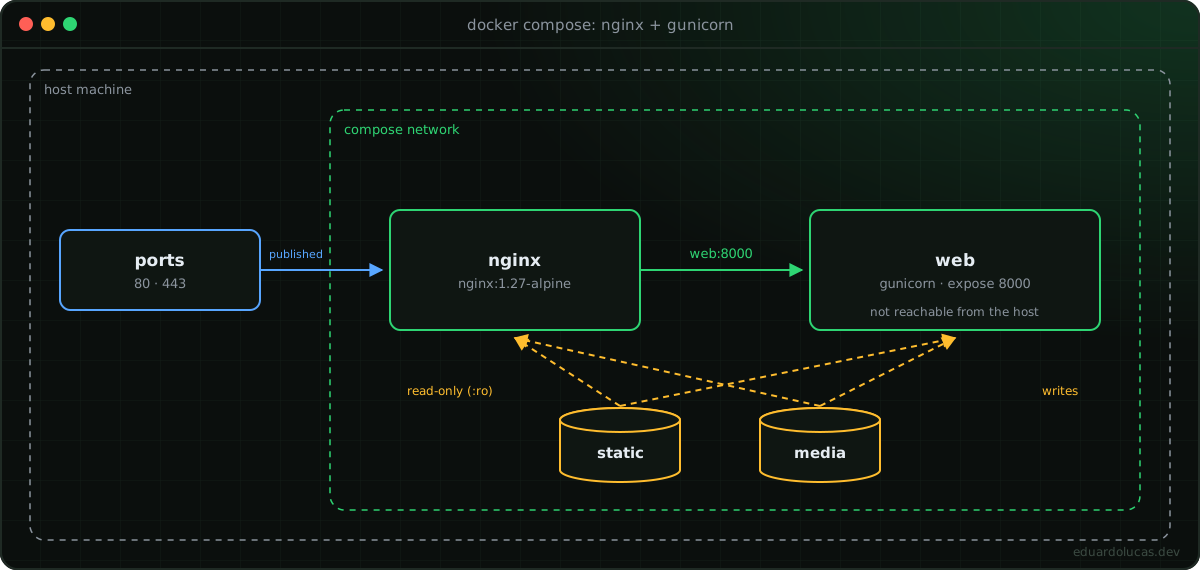 Only NGINX publishes ports; Gunicorn is reachable solely inside the Compose network.
To scale horizontally: docker compose up --scale web=3. Docker's internal DNS resolves web to the replicas, though for fine-grained balancing you'd list explicit backends in the upstream block.
4. Lessons learned: the Django side of the proxy
These are the bugs that bite almost everyone the first time Django sits behind NGINX.
Django thinks every request is HTTP. NGINX terminates TLS, so Django receives plain HTTP and generates http:// URLs, breaks secure cookies, and can cause redirect loops.
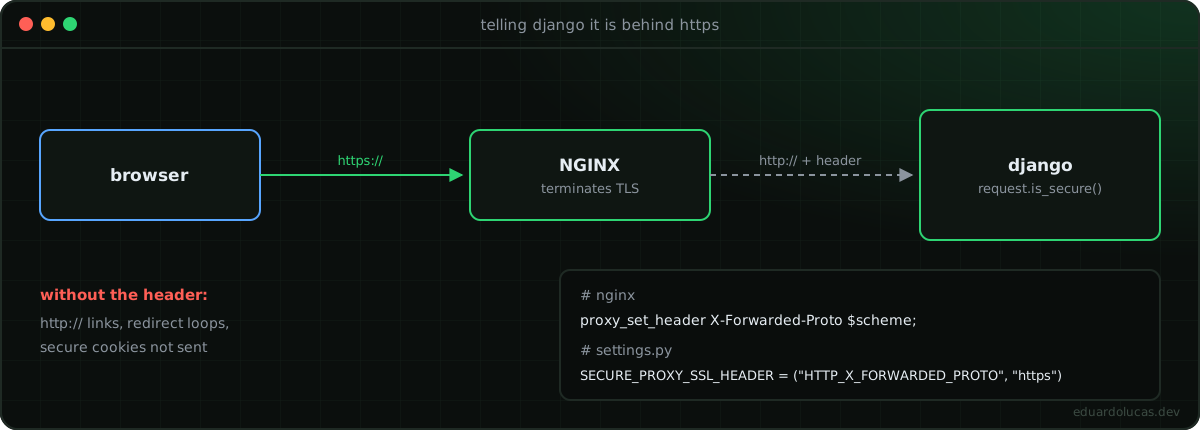 NGINX passes the original scheme along so Django knows the client used HTTPS.
Fix it by trusting the header NGINX sets:
# settings.py
SECURE_PROXY_SSL_HEADER = ("HTTP_X_FORWARDED_PROTO", "https")
SECURE_SSL_REDIRECT = True
SESSION_COOKIE_SECURE = True
CSRF_COOKIE_SECURE = True
Only set SECURE_PROXY_SSL_HEADER if your proxy always sets or overwrites that header — otherwise a client could spoof it.
CSRF failures on POST (403). Since Django 4.0, HTTPS origins must be listed explicitly:
CSRF_TRUSTED_ORIGINS = ["https://example.com"]
ALLOWED_HOSTS = ["example.com"]
Every request appears to come from the same IP. That IP is NGINX. Read the real client from X-Real-IP / X-Forwarded-For — but only trust those values when they come from your proxy.
"413 Request Entity Too Large" on uploads. NGINX's default body limit is 1 MB. Raise client_max_body_size to match what your app accepts.
Static files 404 in production. With DEBUG=False, Django doesn't serve static files. Run collectstatic and make sure the NGINX alias points to the same path as STATIC_ROOT (trailing slash included).
5. NGINX in Kubernetes: the Ingress Controller
NGINX's speed and small footprint made it a natural fit for containers, and it became one of the most popular Kubernetes Ingress Controllers.
The idea is the same as before — a proxy and load balancer receiving traffic first — but now it routes to Kubernetes Services based on rules you define:
apiVersion: networking.k8s.io/v1
kind: Ingress
metadata:
  name: shop-ingress
spec:
  ingressClassName: nginx
  rules:
    - host: shop.example.com
      http:
        paths:
          - path: /cart
            pathType: Prefix
            backend:
              service: { name: cart-service, port: { number: 80 } }
          - path: /payments
            pathType: Prefix
            backend:
              service: { name: payment-service, port: { number: 80 } }
A common question: if my cloud already has a load balancer, why do I need NGINX? Because they work at different layers. The cloud load balancer (AWS ELB/ALB, GCP Load Balancer, etc.) is the public entry point. It forwards traffic to the Ingress Controller, which lives inside the cluster network and does the path- and host-based routing to your microservices. Cluster components never face the internet directly.
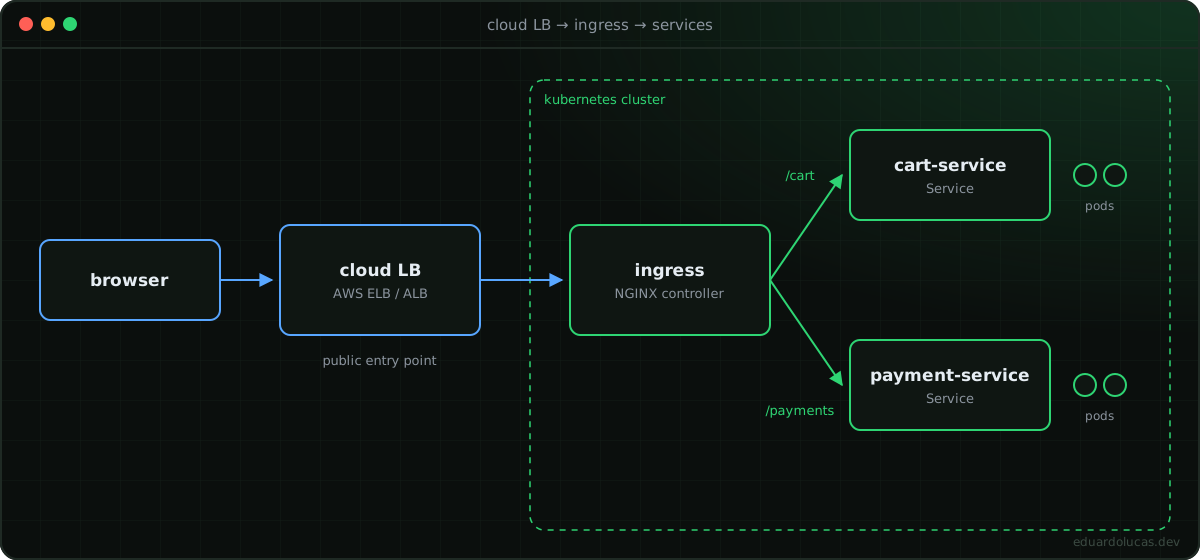 The cloud load balancer is the public door; the Ingress Controller routes inside the cluster.
6. NGINX vs Apache
Functionally, they overlap heavily — both started as web servers and grew into reverse proxies with caching, TLS, and load balancing. The differences are mostly in design:
| NGINX | Apache | |
|---|---|---|
| Architecture | Event-driven, async workers | Process/thread-based (MPMs) |
| Static files at scale | Excellent | Good |
| Per-directory config | No (.htaccess not supported) |
Yes (.htaccess) |
| Container/K8s adoption | Very high | Lower |
Apache was already dominant when NGINX arrived; NGINX won ground by being lighter and faster under high concurrency, with a configuration style many people find simpler.
Key takeaways
- NGINX was built to handle massive concurrency efficiently, using an event-driven model.
- The same software can act as a web server (serving files itself) or a reverse proxy (forwarding to other servers) — the config decides which.
- As a reverse proxy, it gives you load balancing, caching, a smaller attack surface, TLS handling, and compression in one place.
- In Django deployments, let NGINX serve static files and handle HTTPS, and configure
SECURE_PROXY_SSL_HEADERandCSRF_TRUSTED_ORIGINSso Django understands it's behind a proxy. - In Kubernetes, NGINX lives on as an Ingress Controller, sitting behind your cloud load balancer.
Concepts in this post were inspired by TechWorld with Nana's "NGINX Explained" video; the Django examples and lessons learned are my own.