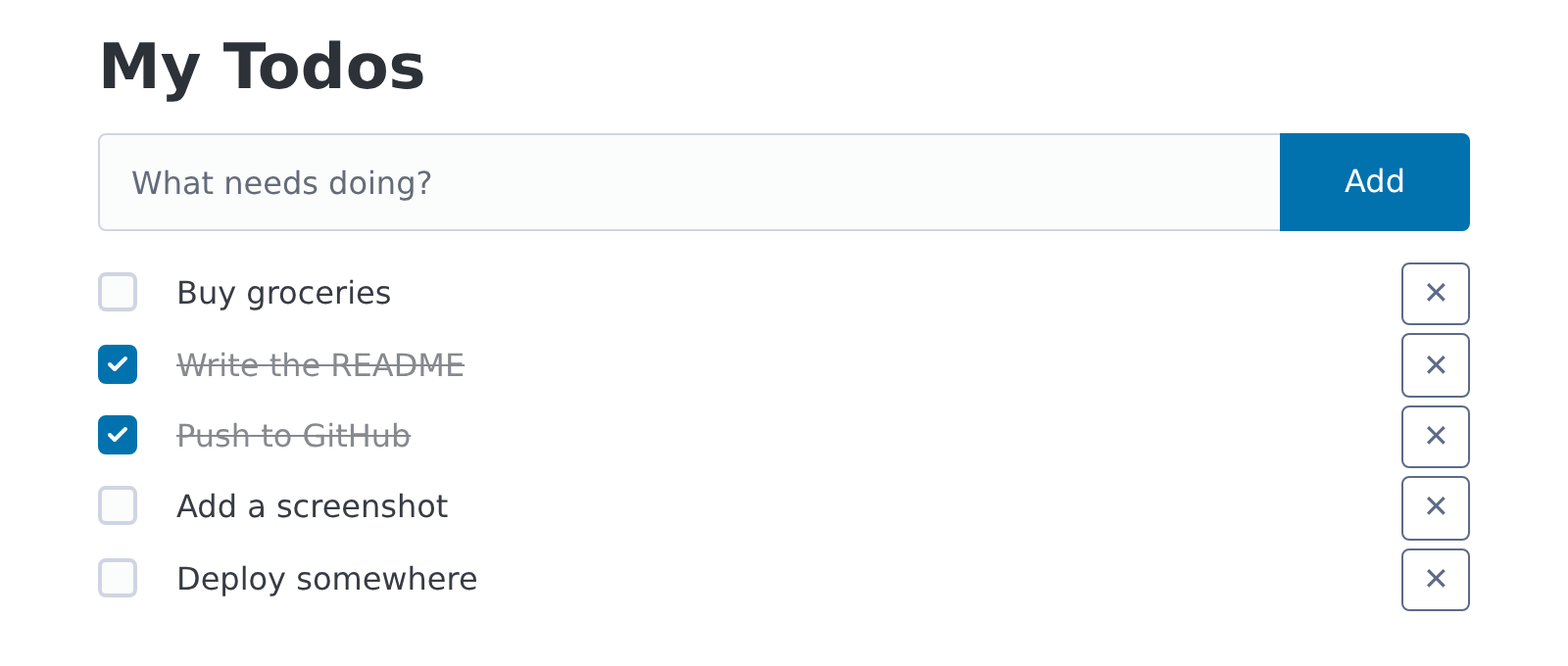
Every web framework gets tested with a todo app, so I built one with FastHTML. I wanted to see how far I could get without writing any JavaScript, running a frontend build, or having an API that returns JSON. It turned out I could build the whole app that way. It's about a hundred lines of Python, and the source is on GitHub.
The stack
- FastHTML renders HTML on the server. You build pages from Python functions like
Li,FormandInputinstead of writing templates. - HTMX makes the page interactive. Attributes like
hx-postandhx-targettell the browser to send a request and put the HTML that comes back into a particular part of the page. - fastlite is a small SQLite wrapper. You describe the table with a dataclass.
- Pico CSS styles plain HTML elements, so the page looks decent without any class names.
FastHTML adds HTMX and Pico to every page by default, so the setup is just a few lines.
The data
The whole database layer is one dataclass and one line to create the table:
from dataclasses import dataclass
from pathlib import Path

from fastlite import database

Path("data").mkdir(exist_ok=True)
db = database("data/todos.db")


@dataclass
class Todo:
    id: int | None = None
    title: str = ""
    done: bool = False


todos = db.create(Todo, pk="id", transform=True)
transform=True updates the table when the dataclass changes. If I add a field later, I don't
have to write a migration by hand.
Components are just functions
Each piece of the UI is a Python function that returns HTML. Here's a single todo:
def todo_item(todo: Todo) -> Li:
    target = f"#todo-{todo.id}"
    return Li(
        Input(
            type="checkbox",
            checked=bool(todo.done),
            hx_post=f"/todos/{todo.id}/toggle",
            hx_target=target,
            hx_swap="outerHTML",
        ),
        Span(todo.title, cls="done" if todo.done else None),
        Button(
            "✕",
            hx_delete=f"/todos/{todo.id}",
            hx_target=target,
            hx_swap="outerHTML",
            cls="secondary outline",
        ),
        id=f"todo-{todo.id}",
    )
Keyword arguments become HTML attributes, so hx_post turns into hx-post. Ticking the
checkbox sends a POST to the server, and HTMX replaces the whole <li> with whatever comes back.
The same function renders a todo on page load and after every change, so the two can't drift
apart.
Routes return HTML fragments
Each route returns only the part of the page that changed:
@app.post("/todos")
def create(title: str):
    return todo_item(todos.insert(Todo(title=title.strip())))

@app.post("/todos/{id}/toggle")
def toggle(id: int):
    todo = todos[id]
    todo.done = not todo.done
    return todo_item(todos.update(todo))

@app.delete("/todos/{id}")
def delete(id: int):
    todos.delete(id)
    return ""  # empty response + outerHTML swap removes the <li>
The delete route is my favorite. It returns an empty body, and because the button swaps
outerHTML, HTMX replaces the <li> with nothing. The item disappears without any
client-side code to remove it.
Adding a todo works the same way. The form posts to /todos and appends the new <li> to the
list with hx_swap="beforeend". One more attribute clears the input when the request finishes:
**{"hx-on::after-request": "this.reset()"}
This line uses a dict because hx-on::after-request isn't a valid Python keyword argument.
Three things that tripped me up
The app didn't run on the first try. These are the problems I hit, in case they save someone else some time.
1. Group isn't in fasthtml.common. Pico's Group joins an input and a button into one
row. I tried to import it from fasthtml.common along with everything else, and with
python-fasthtml 0.14.13 that failed. It lives in fasthtml.pico:
from fasthtml.common import Button, Form, Input, Li, Span, Ul
from fasthtml.pico import Group
2. fastlite wasn't installed. Installing python-fasthtml 0.14.13 didn't pull in fastlite, so
I got ModuleNotFoundError: No module named 'fastlite'. Adding it as a dependency fixed it:
uv add fastlite
3. Every todo showed up as done. This was the sneaky one. SQLite has no boolean type, so
done comes back from the database as 0 or 1. Passing checked=todo.done rendered
checked="0", and in HTML any checked attribute means the box is checked, whatever its value.
Every todo looked finished. Converting to a real boolean fixed it:
checked=bool(todo.done)
With True, FastHTML writes checked. With False, it leaves the attribute out.
Running it
The entrypoint is short:
from fasthtml.common import Link, fast_app, serve

from app.routes import register

app, rt = fast_app(hdrs=(Link(rel="stylesheet", href="/static/style.css"),))
register(app)

serve()
With uv installed, you can run it like this:
git clone https://github.com/Eduardo-Lucas/fasthtml-todo
cd fasthtml-todo
uv run main.py
Then open http://localhost:5001.
What I liked
Because everything is HTML, I only had to think in one place. There's no client-side state to keep in sync with the server, and no JSON to design. Each route answers the question "what should this part of the page look like now?" For small apps like this, that's a lot less to build. I'd like to see how the approach holds up on something bigger. My next step is deploying it somewhere.